Your public profile gives people a place to understand your work, explore your AR projects and find your website. A clear profile also helps you build a personal brand: a recognisable connection between your name, your specialism and the experience you create.
This tutorial uses Bernie Torras's profile as a real example. The same approach can help AR artists, designers, curators, educators and other professionals working with augmented reality. The dashboard calls this area My Artist Profile; use the biography to explain your own role and audience.
Allow around 20 minutes. Have your profile image, website and a short description of your practice ready. Start in Dashboard → Profile at https://app.painta.me/dashboard/profile. The screenshots show the English interface.
1. Decide what you want to be recognised for
Before editing, finish this sentence: “I am a [role] who uses AR to [specific experience] for [audience or context].” This is your starting point for positioning within the sector. Choose a focus that someone can understand and remember, then support it with real projects.
For example, painting with AR animation, interactive exhibitions, spatial product storytelling and AR learning experiences each communicate a different specialism. Pick language that describes the work you actually do. You can have several interests, but the opening sentence should give visitors a clear way into your practice.
In Bernie's example, painting is the starting point and movement and interaction are the AR contribution. That connection gives the biography a concrete subject and helps a visitor know what to look for in the portfolio.
2. Make your identity easy to recognise
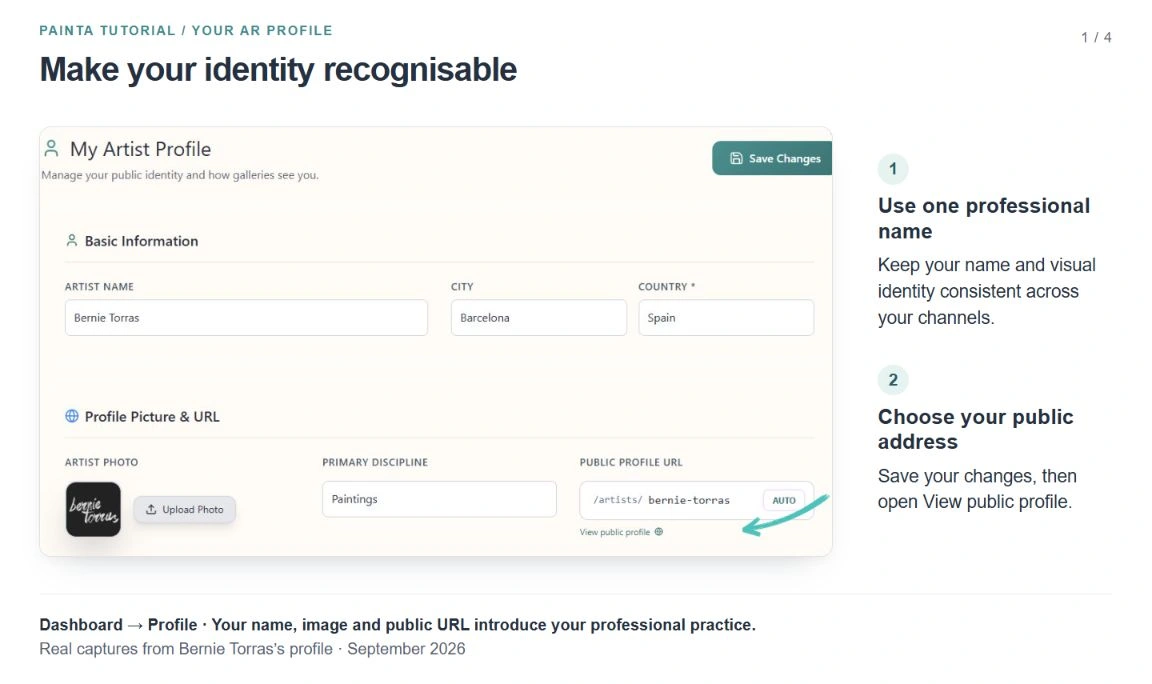
In Basic Information, review Artist Name, City and Country. Use the professional name you want people to remember and keep its spelling consistent with your website and social profiles. Your location gives visitors useful context.
In Profile Picture & URL, choose a clear Artist Photo. A recognisable portrait works well for an individual; an established visual identity can work for a studio or professional practice. Bernie's example uses his signature mark. Check that your image remains legible at the small size used in the public header.
Choose the closest available Primary Discipline. The choices describe media, such as Paintings, Digital Art or Product Design. Use your bio to explain a role such as curator or educator more precisely.
Review Public Profile URL. The AUTO button derives an address from your name; you can also edit the final part yourself. A short, readable address is easier to share. Once you have circulated it, keep it consistent and check existing links before changing it. Click Save Changes after completing your edits.
3. Write a short bio that introduces your specialism
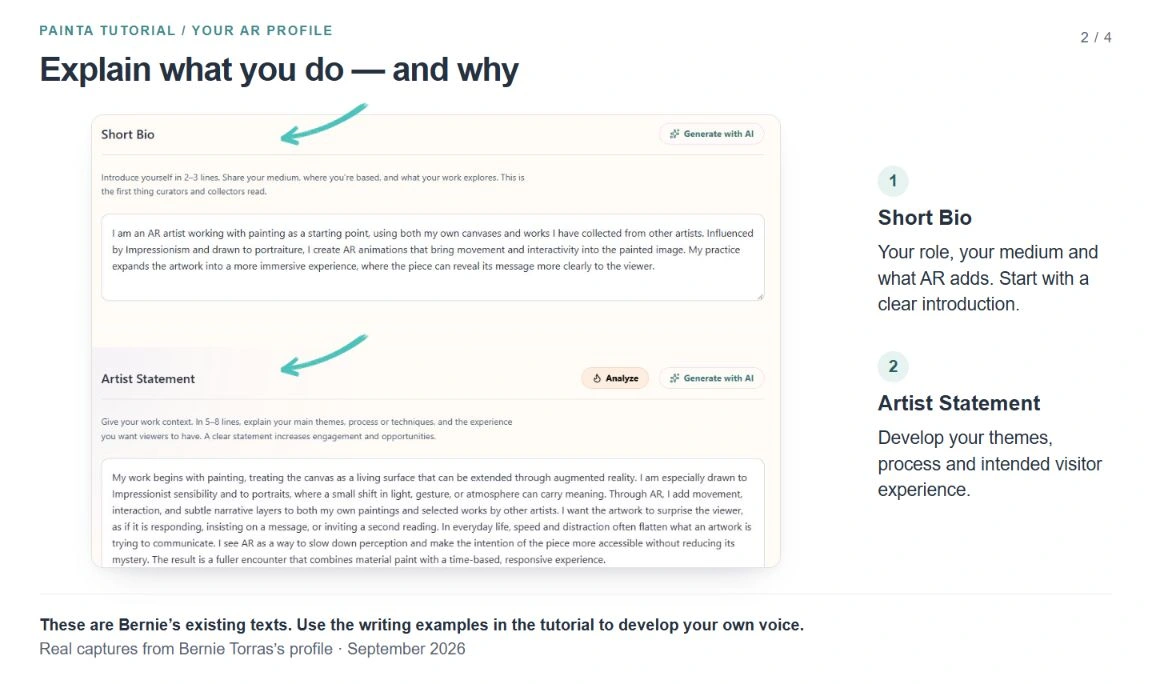
Short Bio answers three questions: who are you, what do you work with, and what does AR add? The panel suggests 2–3 lines. Treat that as an editing guide: keep the opening concise, because line length changes across devices.
Try this structure: “[Role and location]. I combine [medium or process] with augmented reality to [experience or purpose]. My work focuses on [specific theme or context].”
The following are writing examples to adapt to your own experience, rather than descriptions of existing Painta users:
- Artist: “I am a Barcelona-based artist combining painting with AR animation. My work uses movement and interaction to invite a second reading of the painted image.”
- AR designer: “I design augmented reality experiences for cultural and creative projects. I combine 3D content and interaction to help audiences explore objects and stories.”
- Curator or educator: “I develop AR experiences for exhibitions and learning. My practice connects collection stories with accessible, interactive interpretation.”
Use concrete words and make your contribution clear. If you work with another artist's painting, a museum object or a shared project, distinguish the original work from the AR experience you created.
4. Use the Artist Statement to explain your approach
Artist Statement gives your work more context. Develop the introduction by explaining what interests you, how you work and what you want the visitor to experience. The panel suggests 5–8 lines; a few focused paragraphs are easier to follow than a list of broad claims.
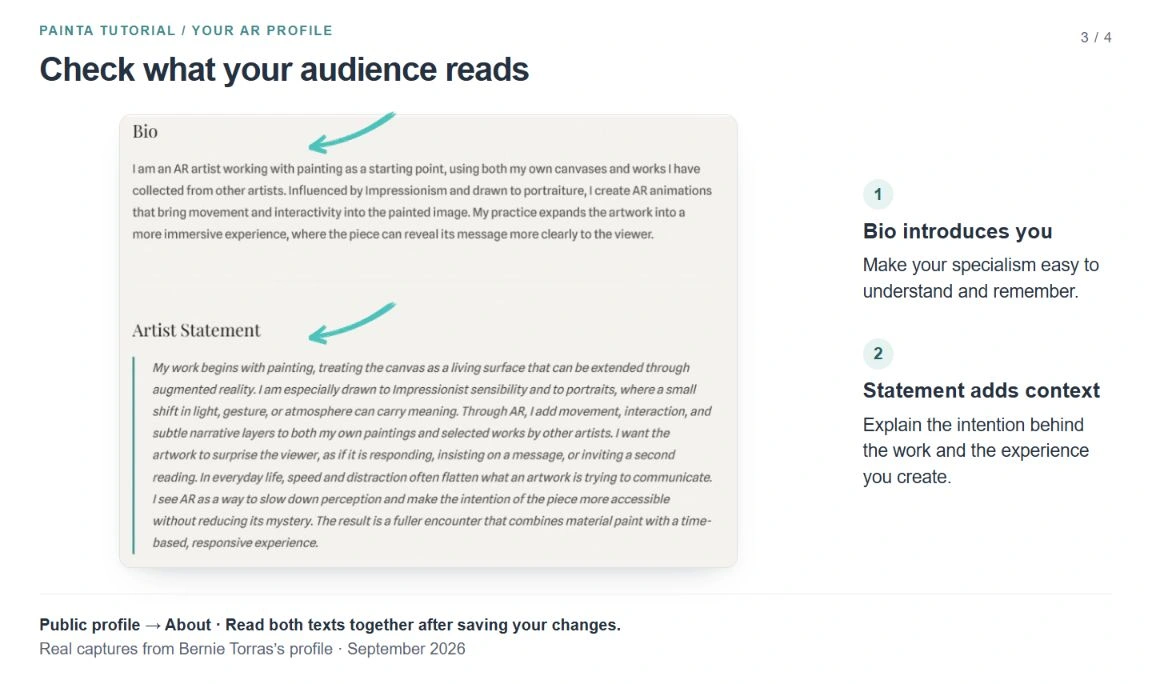
Bernie's statement explains how painting becomes a surface for movement, interaction and narrative, and why he wants viewers to spend more time with an artwork. It connects the technique to an intention. A designer could explain interaction choices; a curator could describe an interpretive approach; an educator could describe the learning experience.
The panel includes Generate with AI, and the statement also offers Analyze. If you use these tools, review the result so it sounds like you and accurately describes your work. Finish with Save Changes.
On the public profile, open About. Short Bio appears under Bio, and Artist Statement appears beneath it. Read them together: the first should introduce you quickly, and the second should add context.
5. Give interested visitors a useful next step
In Social Networks, enter your website with its full address, including https://. For Instagram and X (Twitter), enter the account name rather than a full profile URL; the fields already show the platform prefix. Choose active professional channels that help people understand your practice.
After saving, open the public profile and test the visible website and social icons. The website is a useful route to your contact details, services or a longer portfolio. Make the next step clear on that destination page, whether it is discussing an exhibition, a commission, a collaboration or a workshop.
CV & Documents also lets you upload a PDF CV. Keep it relevant to your practice and suitable for public download. Include selected projects, education or experience you can substantiate. After saving, check About for the Download PDF link before sharing the profile.
6. Let your published work support your positioning
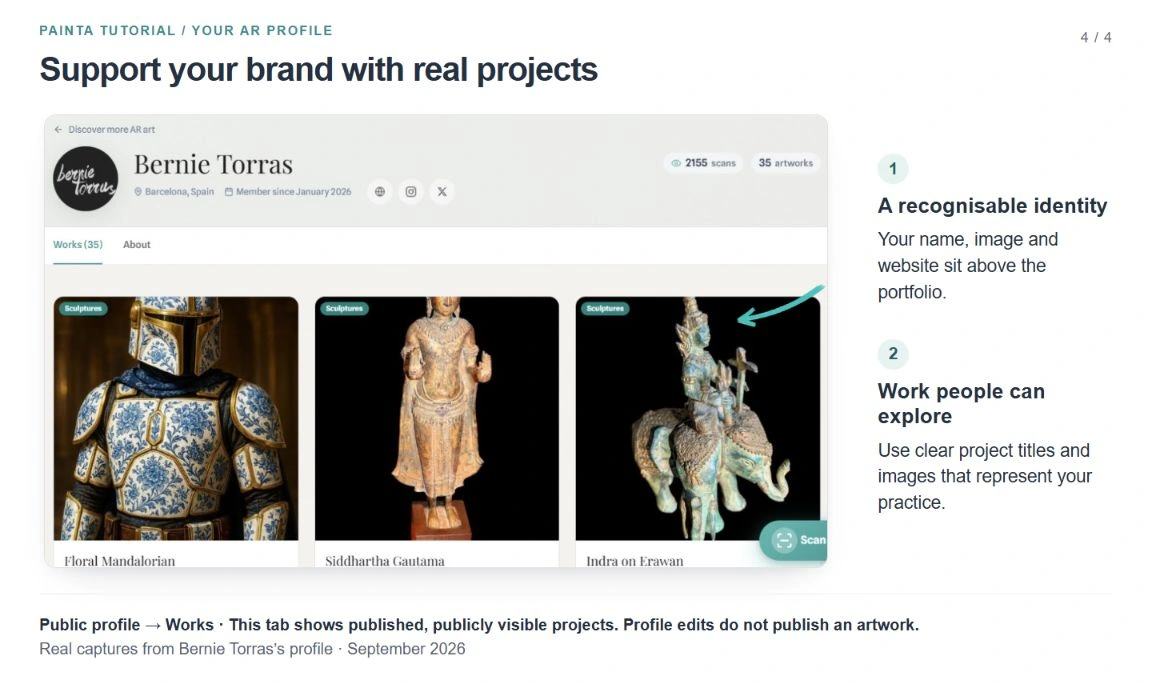
Open Works on the public profile. This is where visitors move from reading about your practice to exploring your published, publicly visible projects. Saving your profile does not publish an artwork: manage each project's publication and visibility from Artworks.
Review your project titles, preview images and descriptions. Make it easy to understand what the project is and what you contributed. Explain the original object or artwork, your AR intervention and any collaborators where relevant. If your bio promises interactive storytelling, give visitors projects that demonstrate it.
Bernie's Works tab includes painting-based AR, digital work and sculpture experiences. The page provides a practical example of how a professional identity can bring several formats together. When your practice evolves, update the bio and statement so they still describe the work visitors encounter.
7. Share one consistent professional destination
Use View public profile in the dashboard to open your public address. For the example in this tutorial, it is https://www.painta.me/artists/bernie-torras. Share your own public URL with audiences; the dashboard address is where you edit your account.
Add that public link to your website, email signature, social biography or presentation materials. Reuse a consistent name, profile image and one-sentence introduction across those touchpoints. When sharing an individual project, explain its relevance to your specialism and give people a route back to your wider work.
If your plan includes the Branding section, you can also customise the artwork Scan QR presentation with your name or logo and print options. That QR opens the artwork scanning experience. Use the public profile URL when your intention is to introduce your professional practice.
8. Check the experience before sharing
- Click Save Changes and wait for the confirmation.
- Open View public profile and check your name, image and location.
- Read About and remove repetition between the bio and statement.
- Explore Works and open a project that represents your current focus.
- Test your visible website and social links, and the PDF link if you added one.
- Open the public address on your phone and check that text and images are clear.
- Ask a colleague to describe your specialism after a quick visit. If their answer is unclear, simplify the opening sentence.
Revisit the profile when you publish a significant project, change your focus or update your contact destination. A consistent profile, supported by work you can show and explain, gives people a clearer reason to remember you within the AR sector.