Real-time rendering creates images from a scene quickly enough to respond during an interactive experience, updating the view as the camera, objects or other inputs change.
The image is made as the visitor explores
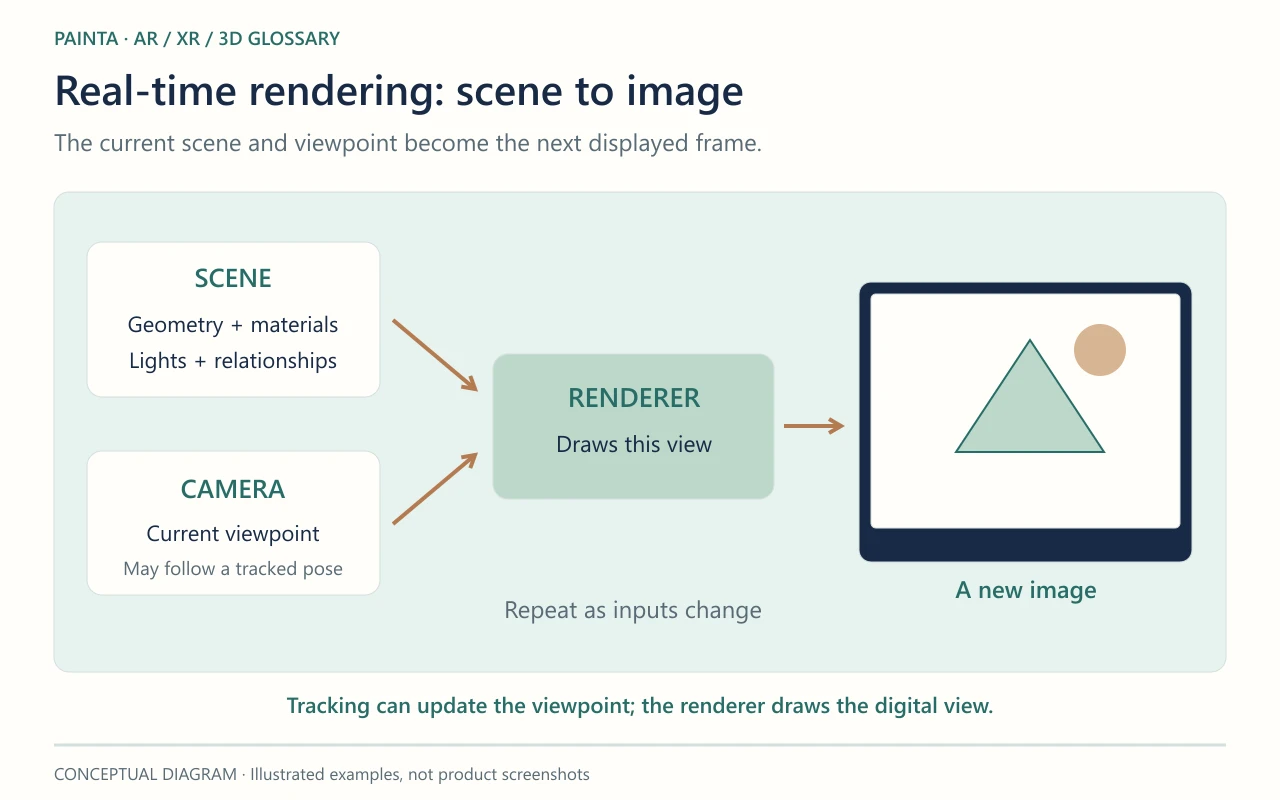
Walk around a virtual sculpture and its visible side changes. The application draws a new view from the current camera position rather than selecting the next frame of a pre-recorded film. A scene graph describes the objects and their relationships; geometry, materials, lights and the camera contribute to the result. The diagram separates those ingredients from the image the visitor sees. It simplifies a pipeline that can contain several rendering passes.
Rendering and tracking do different jobs
In an AR experience, tracking estimates a relationship with the physical world, while rendering draws the digital view. A tracker may supply a pose that influences the camera or an object. A rendering library such as Three.js can then help draw the scene. A beautifully lit object can still be poorly aligned, just as accurate tracking can accompany an expensive scene that updates too slowly. Identify which part is failing before changing the artwork.
Real-time does not mean photorealistic
A flat illustration, a stylised sculpture and a carefully lit replica can all be rendered interactively. Physically based rendering describes a material and lighting approach; it is not another name for real-time rendering. A pre-rendered film can use that approach too. Likewise, an interactive scene may contain video textures: drawing the overall scene in real time does not turn those recordings into free-viewpoint 3D objects.
Choose detail for the actual encounter
For an exhibition made with Painta, keep the visitor viewpoint in mind. A face seen close up may need detail that an unseen underside does not. Consider geometry, texture memory, transparency, lighting and frame rate together. A small download does not automatically mean inexpensive rendering. Compare the complete scene on the intended device, including narration and other media, so visual richness supports the encounter instead of making it difficult to follow.